 Social Media Engine Help
Read the warning beside a channel in Compose and correct the copy or media it identifies. A mark applies to that channel’s version.
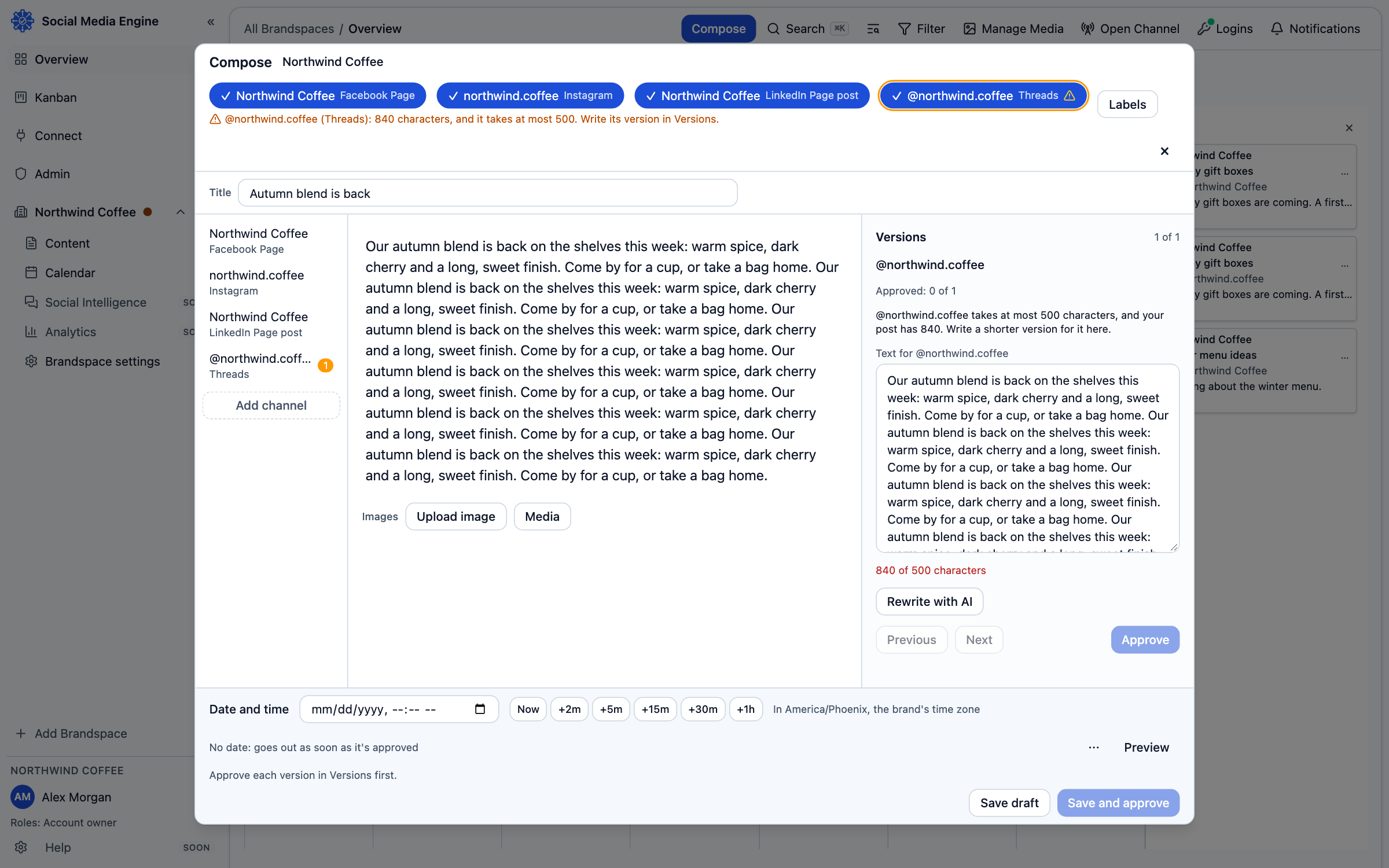
Read the reason beside the channel
A mark means the selected copy or media does not meet a check SME knows for that channel. The app can check text length and known media needs. It may show a character count against a limit, require media or explain that the selected file cannot be used. A warning is specific to that channel; the same copy can still be ready for another one.
- In Compose, select the marked channel chip.
- Read the reason shown for that channel.
- Open Versions and adjust its copy if the text is too long or unsupported.
- Replace or add media if that is the stated problem.
- Return to the channel and confirm the warning is cleared before submitting or approving.
Know what the mark does not mean
A clear channel check means the known app rules pass; the platform can still refuse a post for a reason SME cannot predict. That refusal appears later as a publishing problem. The warning does not make a change by itself, and a channel-specific version is not created unless you change it or choose Rewrite with AI.