 Social Media Engine Help
Set up a Brandspace, connect a login, select a channel and save your first dated post. Follow these steps when starting with an empty SME account.
Set up the place for your work
A Brandspace groups the people, brands, posts and media for one area of work. A brand is the name the audience sees. Start with one Brandspace and one brand, then add more when your work calls for them. A product can label a post topic under a brand, but it is optional for a first post. Read How SME is organised before adding more layers.
- Open the Brandspace menu and choose Add Brandspace if you need a separate business space.
- Open Brandspace settings and choose Add brand. Give it your brand's name.
- If you use products, add one under the brand. You can leave this until you need it.
Connect, write and schedule
First connect your own platform sign-in, then choose the Page or profile the brand can use. The connection is your sign-in; the channel is the destination for posts. The connection guide and channel guide show those separate steps.
- Open Connect, then Logins, and select Add a login.
- Finish the platform sign-in and return to SME.
- Open Connect, then Channels. Under Where to post, select the destination and assign it to your brand.
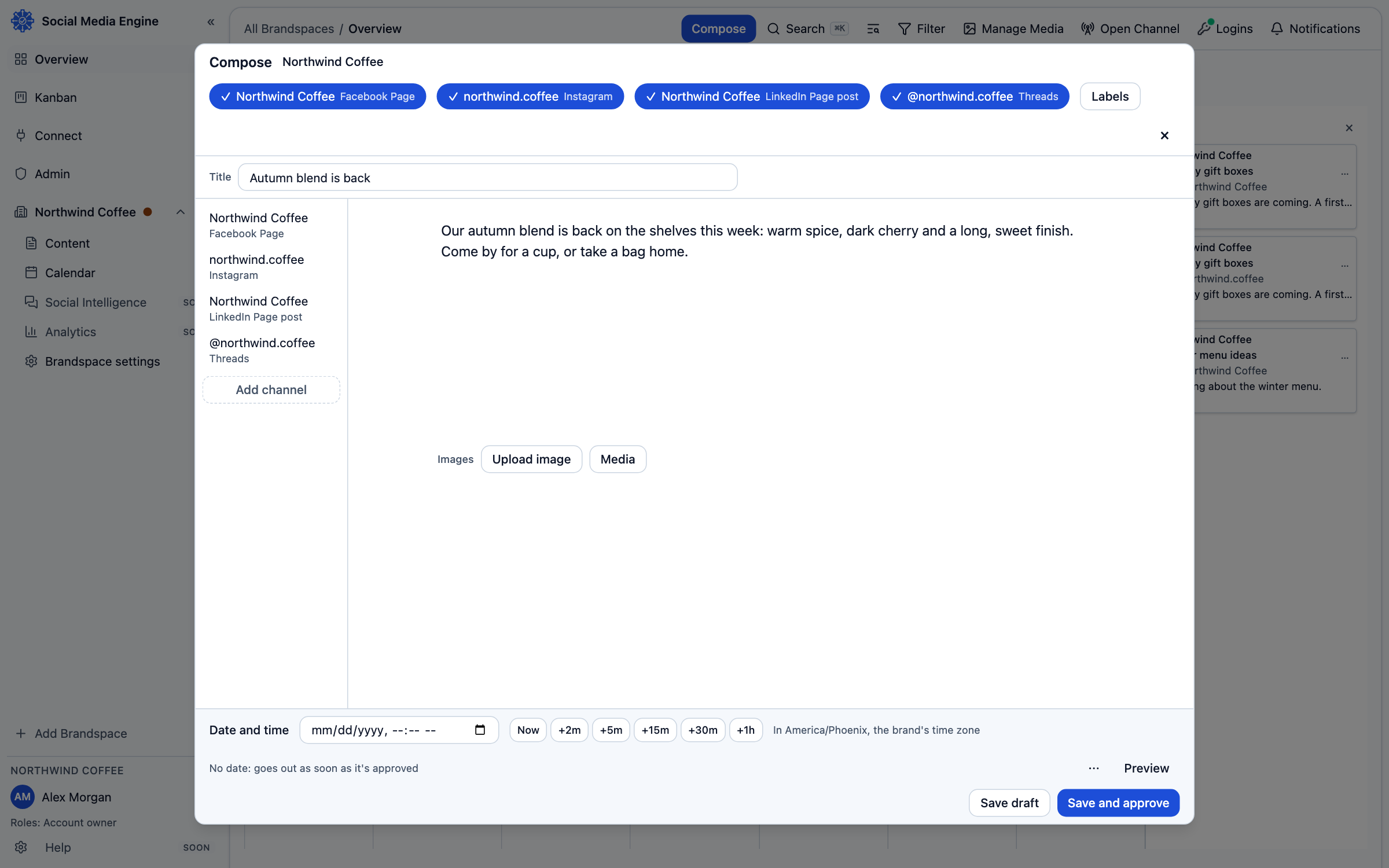
- Select Compose. Choose the brand and channel, write the copy, and add a picture if the channel requires one.
- Set Date and time, review the preview and any channel warnings, then choose Save and approve if you have approval permission. Otherwise choose Save and send for review.